Overview
UnLuaNova is a feature-rich and high optimized scripting solution for UE. Developes can develop game logic using Lua with it, and it's possible to iterate game logic much more faster with Lua's hotload feature. This document will introduce the major features and basic programming pattern of UnLuaNova.
Lua&Engine Binding
UnLuaNova provides a simple way to bind Lua and engine, including static binding and dynamic binding:
Static Binding
C++
Your UCLASS only need to implement IUnLuaNovaInterface, and return a Lua file path in GetModuleName_Implementation().
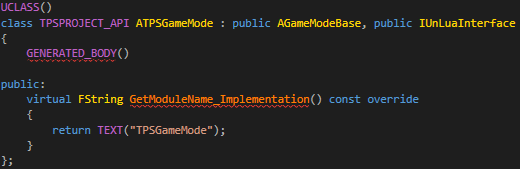
Blueprints
Your blueprint only need to implement UnLuaNovaInterface, and return a Lua file path in GetModuleName().

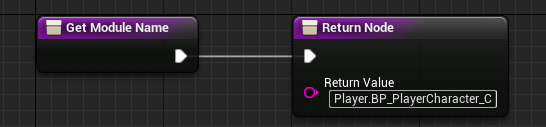
Dynamic Binding
Dynamic binding is suitable for runtime spawned Actors and Objects.
Actor
local Proj = World:SpawnActor(ProjClass, Transform, ESpawnActorCollisionHandlingMethod.AlwaysSpawn, self, self.Instigator, "Weapon.BP_DefaultProjectile_C")
Object
local ProxyObj = NewObject(ObjClass, nil, nil, "Objects.ProxyObject")
Lua File Path
Both static and dynamic binding need a Lua file path. It's a relative path to project's 'Content/Script'.
Lua Calls Engine
UnLuaNova provides two ways to access engine from Lua side: 1. dynamically export using reflection system; 2. statically export classes, member variables, member functions, global functions and enums outside the reflection system.
Dynamically Export using Reflection System
Dynamically export using reflection system makes codes clean, intuitive, and it can eliminate huge glue codes.
Access UCLASS
local Widget = UWidgetBlueprintLibrary.Create(self, UClass.Load("/Game/Core/UI/UMG_Main"))
_C], for example: AActor (Native Class), ABP_PlayerCharacter_C(Blueprint Class)
Access UFUNCTION
Widget:AddToViewport(0)
Widget:AddToViewport()
Output Values Handling
Output Values includes non-const reference parameters and return parameter. Both of them distinguish primitive types (bool, integer, number, string) and non-primitive types (userdata).
Non-Const Reference Parameters
Primitive Types

Lua codes:
local Level, Health, Name = self:GetPlayerBaseInfo()
Non-Primitive Types

There are two ways to call it in Lua:
local HitResult = FHitResult()
self:GetHitResult(HitResult)
local HitResult = self:GetHitResult()
Return Parameter
Primitive Types

Lua codes:
local MeleeDamage = self:GetMeleeDamage()
Non-Primitive Types

There are three ways to call it in Lua:
local Location = self:GetCurrentLocation()
local Location = FVector()
self:GetCurrentLocation(Location)
local Location = FVector()
local LocationCopy = self:GetCurrentLocation(Location)
local Location = FVector()
self:GetCurrentLocation(Location)
local LocationCopy = Location
Latent Function
Latent functions allow developers to develop asynchronous logic using synchronous coding style. A typical latent function is Delay:

You can call latent function in Lua coroutines:
coroutine.resume(coroutine.create(function(GameMode, Duration) UKismetSystemLibrary.Delay(GameMode, Duration) end), self, 5.0)
Optimization
UnLuaNova optimizes UFUNCTION invoking in following two points:
- Persistent parameters buffer
- Optimized local function invoking
- Optimized parameters passing
- Optimized output values handling
Access USTRUCT
local Position = FVector()
Access UPROPERTY
local Position = FVector()
Position.X = 256.0
Delegates
-
Bind
InterpFunc is a Delegate of FTimelineFloatTrack, 'Bind' binds a callback (BP_PlayerCharacter_C.OnZoomInOutUpdate) for InterpFunc.FloatTrack.InterpFunc:Bind(self, BP_PlayerCharacter_C.OnZoomInOutUpdate) -
Unbind
InterpFunc is a Delegate of FTimelineFloatTrack, 'Unbind' unbinds the callback for InterpFunc.FloatTrack.InterpFunc:Unbind() -
Execute
InterpFunc is a Delegate of FTimelineFloatTrack, 'Execute' calls the function on the object bound to InterpFunc.FloatTrack.InterpFunc:Execute(0.5)
Multicast Delegates
-
Add
OnClicked is a MulticastDelegate of UButton, 'Add' adds a callback (UMG_Main_C.OnClicked_ExitButton) for OnClicked.self.ExitButton.OnClicked:Add(self, UMG_Main_C.OnClicked_ExitButton) -
Remove
OnClicked is a MulticastDelegate of UButton, 'Remove' removes a callback (UMG_Main_C.OnClicked_ExitButton) for OnClicked.self.ExitButton.OnClicked:Remove(self, UMG_Main_C.OnClicked_ExitButton) -
Clear
OnClicked is a MulticastDelegate of UButton, 'Clear' clears all callbacks for OnClicked.self.ExitButton.OnClicked:Clear() -
Broadcast
OnClicked is a MulticastDelegate of UButton, 'Broadcast' calls all functions on objects bound to OnClicked.self.ExitButton.OnClicked:Broadcast()
Access UENUM
Weapon:K2_AttachToComponent(Point, nil, EAttachmentRule.SnapToTarget, EAttachmentRule.SnapToTarget, EAttachmentRule.SnapToTarget)
Customized Collision Enums
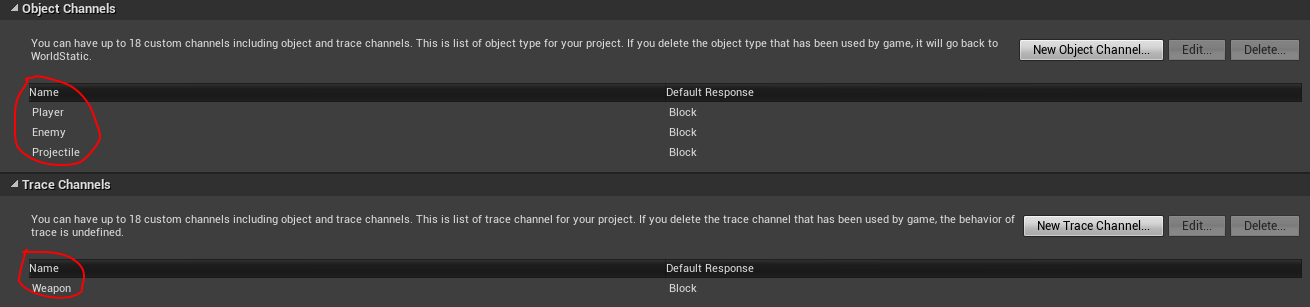
-
EObjectTypeQuery
EObjectTypeQuery.Player, EObjectTypeQuery.Enemy and EObjectTypeQuery.Projectile are customized Object Channels.local ObjectTypes = TArray(EObjectTypeQuery) ObjectTypes:Add(EObjectTypeQuery.Player) ObjectTypes:Add(EObjectTypeQuery.Enemy) ObjectTypes:Add(EObjectTypeQuery.Projectile) local bHit = UKismetSystemLibrary.LineTraceSingleForObjects(self, Start, End, ObjectTypes, false, nil, EDrawDebugTrace.None, HitResult, true) -
ETraceTypeQuery
ETraceTypeQuery.Weapon is a customized Trace Channel.local bHit = UKismetSystemLibrary.LineTraceSingle(self, Start, End, ETraceTypeQuery.Weapon, false, nil, EDrawDebugTrace.None, HitResult, true)
Manually Exported Libraries
For customization and performance considerations, UnLuaNova manually exports several important classes in the engine, including the following (See the codes for details):
Basic Classes
- UObject
- UClass
- UWorld
Common Containers
- TArray
- TSet
- TMap
Example
    local Indices = TArray(0)
    Indices:Add(1)
    Indices:Add(3)
    Indices:Remove(0)
    local NbIndices = Indices:Length()
    local Vertices = TArray(FVector)
    local Actors = TArray(AActor)
Math Libraries
- FVector
- FVector2D
- FVector4
- FQuat
- FRotator
- FTransform
- FColor
- FLinearColor
- FIntPoint
- FIntVector
Statically Export
UnLuaNova provides a simple solution to export classes, member variables, member functions, global functions and enums outside the reflection system statically.
Classes
-
Non-reflected classes
OrBEGIN_EXPORT_CLASS(ClassType, ...)'...' means type list of parameters in constructor.BEGIN_EXPORT_NAMED_CLASS(ClassName, ClassType, ...) -
Reflected classes
OrBEGIN_EXPORT_REFLECTED_CLASS(UObjectType)'...' means type list of parameters in constructor.BEGIN_EXPORT_REFLECTED_CLASS(NonUObjectType, ...)
Member Variables
ADD_PROPERTY(Property)
ADD_BITFIELD_BOOL_PROPERTY(Property)
Member Functions
Non-static member functions
-
Compact style
OrADD_FUNCTION(Function)ADD_NAMED_FUNCTION(Name, Function) -
Complete style
OrADD_FUNCTION_EX(Name, RetType, Function, ...)'...' means parameter types.ADD_CONST_FUNCTION_EX(Name, RetType, Function, ...)
Static member functions
ADD_STATIC_FUNCTION(Function)
ADD_STATIC_FUNCTION_EX(Name, RetType, Function, ...)
Example
struct Vec3
{
    Vec3() : x(0), y(0), z(0) {}
    Vec3(float _x, float _y, float _z) : x(_x), y(_y), z(_z) {}

    void Set(const Vec3 &V) { *this = V; }
    Vec3& Get() { return *this; }
    void Get(Vec3 &V) const { V = *this; }

    bool operator==(const Vec3 &V) const { return x == V.x && y == V.y && z == V.z; }

    static Vec3 Cross(const Vec3 &A, const Vec3 &B) { return Vec3(A.y * B.z - A.z * B.y, A.z * B.x - A.x * B.z, A.x * B.y - A.y * B.x); }
    static Vec3 Multiply(const Vec3 &A, float B) { return Vec3(A.x * B, A.y * B, A.z * B); }
    static Vec3 Multiply(const Vec3 &A, const Vec3 &B) { return Vec3(A.x * B.x, A.y * B.y, A.z * B.z); }

    float x, y, z;
};

BEGIN_EXPORT_CLASS(Vec3, float, float, float)
    ADD_PROPERTY(x)
    ADD_PROPERTY(y)
    ADD_PROPERTY(z)
    ADD_FUNCTION(Set)
    ADD_NAMED_FUNCTION("Equals", operator==)
    ADD_FUNCTION_EX("Get", Vec3&, Get)
    ADD_CONST_FUNCTION_EX("GetCopy", void, Get, Vec3&)
    ADD_STATIC_FUNCTION(Cross)
    ADD_STATIC_FUNCTION_EX("MulScalar", Vec3, Multiply, const Vec3&, float)
    ADD_STATIC_FUNCTION_EX("MulVec", Vec3, Multiply, const Vec3&, const Vec3&)
END_EXPORT_CLASS()
IMPLEMENT_EXPORTED_CLASS(Vec3)
Global Functions
EXPORT_FUNCTION(RetType, Function, ...)
EXPORT_FUNCTION_EX(Name, RetType, Function, ...)
Example
void GetEngineVersion(int32 &MajorVer, int32 &MinorVer, int32 &PatchVer)
{
    MajorVer = ENGINE_MAJOR_VERSION;
    MinorVer = ENGINE_MINOR_VERSION;
    PatchVer = ENGINE_PATCH_VERSION;
}

EXPORT_FUNCTION(void, GetEngineVersion, int32&, int32&, int32&)
Enums
-
Unscoped enumeration
enum EHand { LeftHand, RightHand }; BEGIN_EXPORT_ENUM(EHand) ADD_ENUM_VALUE(LeftHand) ADD_ENUM_VALUE(RightHand) END_EXPORT_ENUM(EHand) -
Scoped enumeration
enum class EEye
{
    LeftEye,
    RightEye
};

BEGIN_EXPORT_ENUM(EEye)
    ADD_SCOPED_ENUM_VALUE(LeftEye)
    ADD_SCOPED_ENUM_VALUE(RightEye)
END_EXPORT_ENUM(EEye)
Optional 'UE' Namespace
UnLuaNova provides an option to add a namespace 'UE' to all classes and enums in the engine. You can find this option in UnLuaNova.Build.cs.
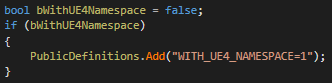
If this option is enabled, your Lua codes should be:
local Position = UE.FVector()
Engine Calls Lua
UnLuaNova provides a Blueprint-like solution to cross the C++/Script boundary. It allows C++/Blueprint codes to call functions that are defined in Lua codes.
Override BlueprintEvent
Your can override all BlueprintEvent in Lua codes. BlueprintEvent includes:
- UFUNCTION tagged with 'BlueprintImplementableEvent'
- UFUNCTION tagged with 'BlueprintNativeEvent'
- All Events/Functions Defined in Blueprints
Example (BlueprintEvent without Return Value)

You can override it in Lua:
function BP_PlayerController_C:ReceiveBeginPlay()
  print("ReceiveBeginPlay in Lua!")
end
Example (BlueprintEvent with Return Values)

There are two ways to override it in Lua:
function BP_PlayerCharacter_C:GetCharacterInfo(HP, Position, Name)
    Position.X = 128.0
    Position.Y = 128.0
    Position.Z = 0.0
    return 99, nil, "Marcus", true
end
function BP_PlayerCharacter_C:GetCharacterInfo(HP, Position, Name)
    return 99, FVector(128.0, 128.0, 0.0), "Marcus", true
end
Override Animation Notifies
AnimNotify:

Lua codes:
function ABP_PlayerCharacter_C:AnimNotify_NotifyPhysics()
    UBPI_Interfaces_C.ChangeToRagdoll(self.Pawn)
end
Override Input Events
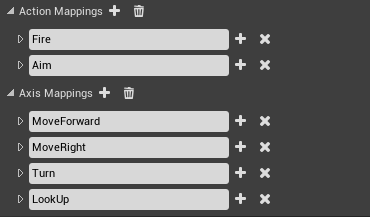
Action Inputs
function BP_PlayerController_C:Aim_Pressed()
    UBPI_Interfaces_C.UpdateAiming(self.Pawn, true)
end

function BP_PlayerController_C:Aim_Released()
    UBPI_Interfaces_C.UpdateAiming(self.Pawn, false)
end
Axis Inputs
function BP_PlayerController_C:Turn(AxisValue)
    self:AddYawInput(AxisValue)
end

function BP_PlayerController_C:LookUp(AxisValue)
    self:AddPitchInput(AxisValue)
end
Key Inputs
function BP_PlayerController_C:P_Pressed()
    print("P_Pressed")
end

function BP_PlayerController_C:P_Released()
    print("P_Released")
end
Other Inputs
You can also override Touch/AxisKey/VectorAxis/Gesture Inputs in Lua.
Override Replication Notifies
If you are developing dedicated/listenning server&clients game, you can override replication notifies in Lua codes:
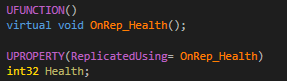
function BP_PlayerCharacter_C:OnRep_Health(...)
    print("call OnRep_Health in Lua")
end
Call Overridden Functions
If you override a 'BlueprintEvent', 'AnimNotify' or 'RepNotify' in Lua, you can still access original function implementation.
function BP_PlayerController_C:ReceiveBeginPlay()
    local Widget = UWidgetBlueprintLibrary.Create(self, UClass.Load("/Game/Core/UI/UMG_Main"))
    Widget:AddToViewport()
    self.Overridden.ReceiveBeginPlay(self)
end
self.Overridden.ReceiveBeginPlay(self) will call Blueprint implemented 'ReceiveBeginPlay'.
Call Lua Functions in C++
UnLuaNova also provides two generic methods to call global Lua funtions and functions in global Lua table in C++ codes.
-
Global functions
template <typename... T> FLuaRetValues Call(lua_State *L, const char *FuncName, T&&... Args); -
Functions in global table
template <typename... T>
FLuaRetValues CallTableFunc(lua_State *L, const char *TableName, const char *FuncName, T&&... Args);
Others
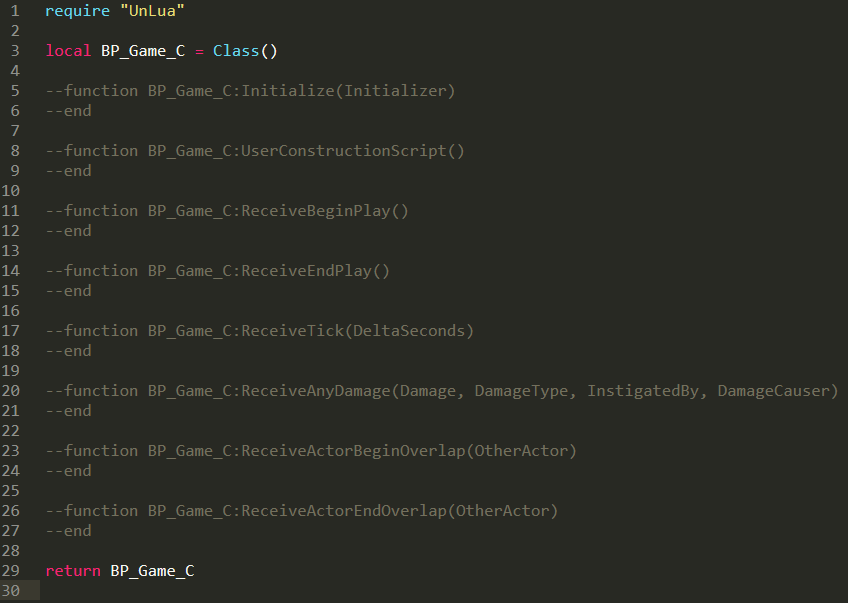
- Lua Template File Export
You can export Lua template file for blueprints:

The template file:
Further reading
- API Reference — API reference
- How To Implement Overriding — How overriding works
- FAQ — Frequently asked questions